
Mixos Live Link – send a mesh from Blender, get a principled material back
Blendernation.com · View original source
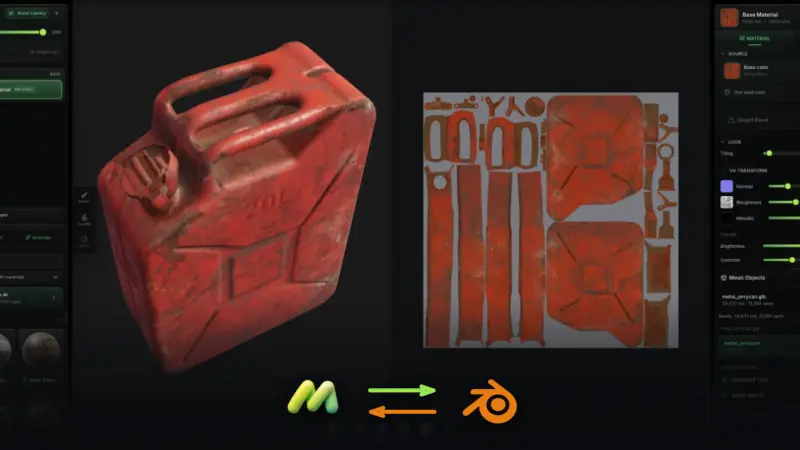
In a significant development for Blender users, Mixos has introduced a new feature called Live Link, which allows for a seamless integration between Blender and the Mixos browser-based texture painting tool. This innovative add-on eliminates the cumbersome export/import process that many creators have found frustrating, enabling a more efficient workflow for 3D artists. With Live Link, users can now send their active 3D objects directly to Mixos for painting and receive a fully textured Principled BSDF material back in Blender, streamlining the creative process.
The Live Link feature operates as a free, GPL-licensed add-on, making it accessible to a wide range of users. To utilize this functionality, artists simply need to press the 'Send to Mixos' button located in the 3D Viewport sidebar (N → Mixos). Once activated, the selected object opens in the Mixos browser interface, where users can paint directly onto it. This two-way communication allows for real-time updates; as textures are modified in Mixos, they automatically sync back to Blender, providing immediate visual feedback. This feature is compatible with Blender versions 3.6 and above, and for users on version 4.2 and higher, installation is as simple as dragging the zip file onto Blender.
Enhancements in Mixos
The introduction of Live Link is part of a broader set of enhancements that Mixos has rolled out since its initial launch. Among these improvements is a new sculpting tool called Mold, which operates within the browser and offers features such as multiresolution subdivision, dynamic topology, and voxel and quad remeshing. Additionally, Mold includes capabilities for masking, symmetry, and weight painting, which are essential for detailed sculpting tasks.
Another noteworthy addition is the Studio app, currently in beta, which provides a comprehensive scene modeling environment. This app supports half-edge polygon modeling, spline generators equipped with a reorderable modifier stack, and various tools for cloners and effectors. Users can also utilize advanced lighting and camera features, including real lenses and depth of field effects, alongside keyframe animation and a path-traced render view. The Studio app supports exports in GLB, glTF, and USDZ formats, further enhancing its utility for creators.
Mixos also offers a robust node materials system, featuring around thirty nodes that operate on the GPU. This system allows for the integration of ambient occlusion, curvature, and edge-wear bakes as graph inputs, enabling users to create intricate materials with emissive, opacity, and transmission channels. Furthermore, the inclusion of a clone stamp tool and an iPhone/iPad app that supports Apple Pencil pressure adds versatility for artists working on mobile devices.
While the core features of Mixos remain free for all users, there is a paid aspect to the platform. Exporting files and utilizing the Live Link feature incurs a fee, which can be covered by a one-time license purchase of $79, allowing users to bypass a subscription model. This pricing structure aims to accommodate different user preferences while maintaining the accessibility of the platform's core functionalities.
Why it matters
The introduction of the Live Link feature in Mixos represents a significant advancement in the workflow of 3D artists using Blender. By eliminating the traditional export/import loop, Mixos enhances productivity and allows artists to focus more on their creative process rather than technical hurdles. The ability to see changes in real-time as textures are painted in the browser is a game-changer, fostering a more intuitive and engaging experience.
For creators and technologists, this development underscores the growing trend toward integrated tools that facilitate collaboration and streamline workflows. As the demand for more efficient processes in 3D modeling and texturing continues to rise, solutions like Mixos are likely to gain traction among professionals and hobbyists alike. Furthermore, the combination of powerful sculpting and scene modeling tools within a browser-based platform could inspire further innovation in the realm of online creative applications, potentially leading to more comprehensive and user-friendly solutions for artists in the future.
Frequently asked questions
- What is Mixos Live Link?
- Mixos Live Link is a free add-on for Blender that allows users to send 3D objects to the Mixos browser-based texture painting tool and receive back a fully textured Principled BSDF material.
- How does the Live Link feature work?
- Users can send their active object to Mixos by pressing 'Send to Mixos' in Blender's 3D Viewport sidebar, where they can paint directly on the object, with changes automatically syncing back to Blender.
- What are the costs associated with using Mixos?
- While Mixos offers free access to its core features, exporting files and using the Live Link feature requires a one-time license purchase of $79.
Related stories
AI & art news in your inbox, daily
The day's top stories, summarized. Free, no spam, unsubscribe anytime.